Animation Properties
The animation properties holds the sequences and the settings for a clip.
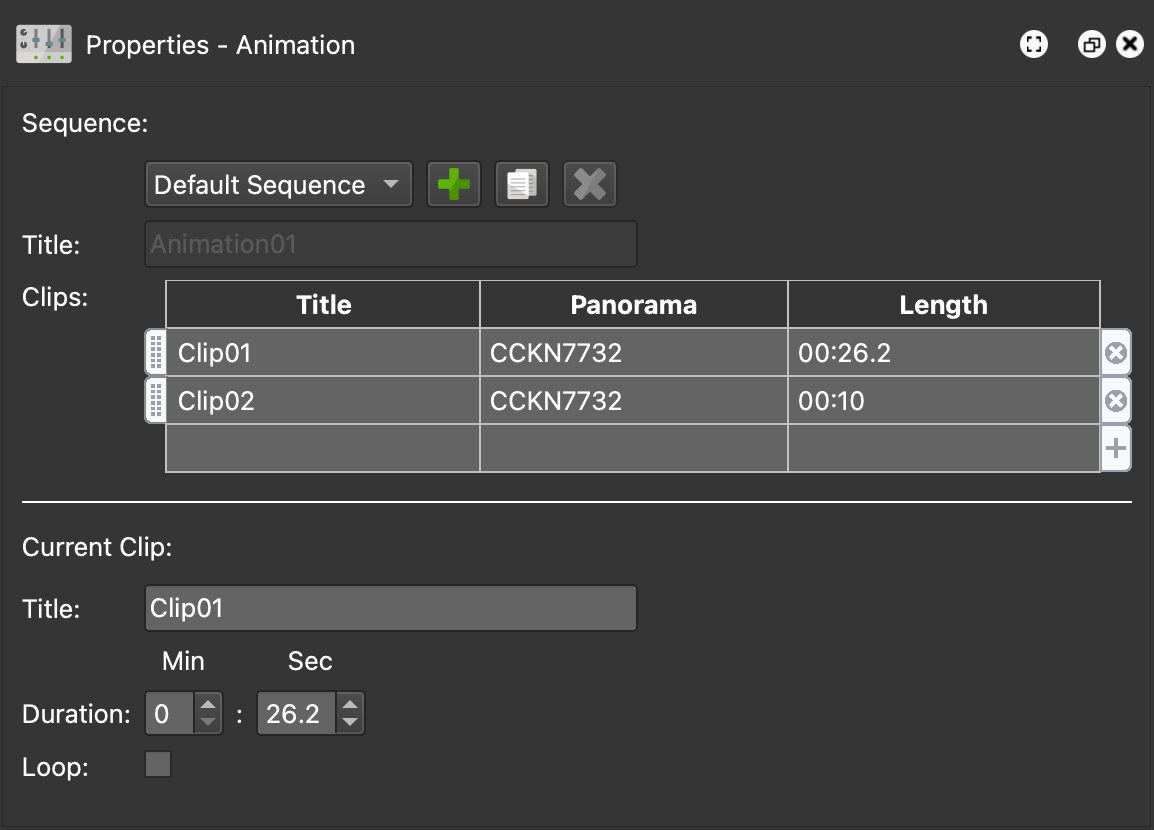
The animation properties will appear in the Properties Panel once a clip is added to the Animation Editor. The properties can also be opened by clicking in the Animation Editor even if the current node does not have an animation clip.
Sequence
The upper portion of the animation properties is dedicated to sequences.
Sequence Selector – This menu holds all the sequences created for the project. A default sequence is automatically created when the first clip has been created in the Editor. The default sequence cannot be deleted, nor can its title be changed.
Add Sequence – Click the green plus to add a new sequence.
Duplicate Sequence – Click to duplicate the selected sequence.
Delete Sequence – Click the red cross to delete the selected sequence. ✭ The default sequence cannot be removed.
Title – Give the sequence a title. ✭ The default sequence’s title cannot be edited.
Clips – This is where the sequence is built. Newly created clips will show up here. Double-click to add a clip to the selected sequence. In the dialog that pops up, choose the node (if multiple) and the clip. Once clips have been added, they can be reordered using the handles. The sequence will play in the order listed here.
Current Clip
This section reflects the currently loaded clip in the animation editor.
Title – The clip’s title.
Duration – The clip’s duration in minutes and seconds.
Loop – Select to loop the animation. Make sure there are no keyframes at the end of the timeline. There should be space (time) after the last keyframe to allow for the movement between the last keyframe and beginning keyframe. If there is not enough time, a warning symbol will appear.