Working with 3D Models
Learn how to add and work with 3D models.
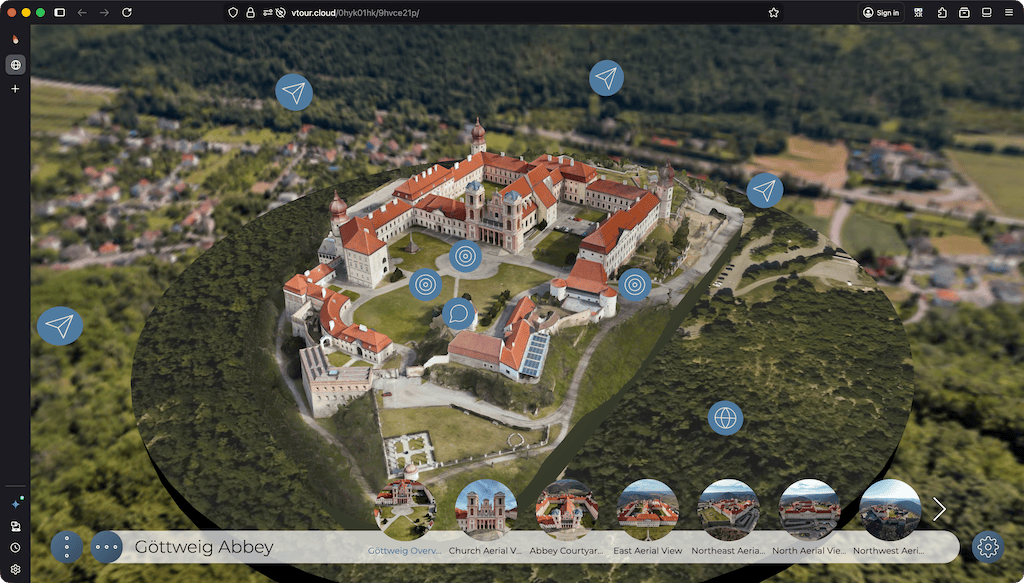
3D models can be integrated into virtual tours to provide context, orientation, and visual detail. They are commonly used to show floor plans, dollhouse views, cutaway models, or to show detail of any 3 dimensional object.
In this section, you’ll learn how to add a 3D model to a tour and use it for seamless transitions between nodes.
If you’re new to creating 3D Models and Gaussian Splats, there are many resources online that teach you how to create them. One of the easiest ways to get started is to use your smartphone and an app like Polycam or Reality Scan. They will use your phone’s Lidar sensor or camera to create a model.
Supported Formats
Pano2VR 8 supported 3D files:
- GLB/glTF
- PLY
- SPLAT
- SPZ
- SOG
Exporting from Mobile Apps
| App Name | To get a Standard Model (Mesh) | To get a Gaussian Splat |
|---|---|---|
| Polycam | Choose GLTF. (Note: This creates a .glb file. This is correct!) |
Choose Splat. (Use the .ply or .splat file) |
| RealityScan | Export as .glb. (If prompted, export via Sketchfab) |
Not supported. |
| Luma AI | Choose Export > Mesh > GLB. (Best for game engines/Blender) |
Choose Export > Splat. (Best for photorealism) |
| Scaniverse | Choose GLB. (Standard mesh) |
Choose SPZ. (Best for speed/quality balance) |
Start with Basic Tutorials
-
Add a 3D model to a tour: Learn how to add a 3D model as a starting point or reference in a virtual tour.
-
Use a 3D model for transitions: See how to use a 3D model to create smooth transitions between tour nodes.
- Moving and adjusting 3D Models: Learn how to move and adjust 3D models in Pano2VR.
Helpful Tools
- Model Converter: OBJ to GLB with WebP or KTX2 textures.
- glTF Editor
- Gaussian Splat Editor and Converter: Supersplat