We are happy to announce another round of updates for Pano2VR 8 beta, Pano2VR 7, and Object2VR 4.
Pano2VR 8 beta 4
Pano2VR 8 beta 4 introduces some new features, and we made many fixes. Among the key updates are significant improvements to Gaussian Splat rendering and camera path transitions.
Improvements
- Added an option to autogenerate smaller resolutions of pinned images
- Added a new Player Muted trigger for logic blocks in the Skin Editor
- 3D models are now auto-centered
- Transition textures can now also be used with Gaussian Splats
- Added support for JPEG XL (.jxl) and WebP for pinned images
- Improved Gaussian Splat rendering performance
- New components for Feather Orb, Material Dart, and Quaranta: Previous/Next, Enter VR, Full Screen, Audio
- Added a way to sort Skin Components using tags and weights (set the weight using _weight_number as a tag; high numbers have high importance)
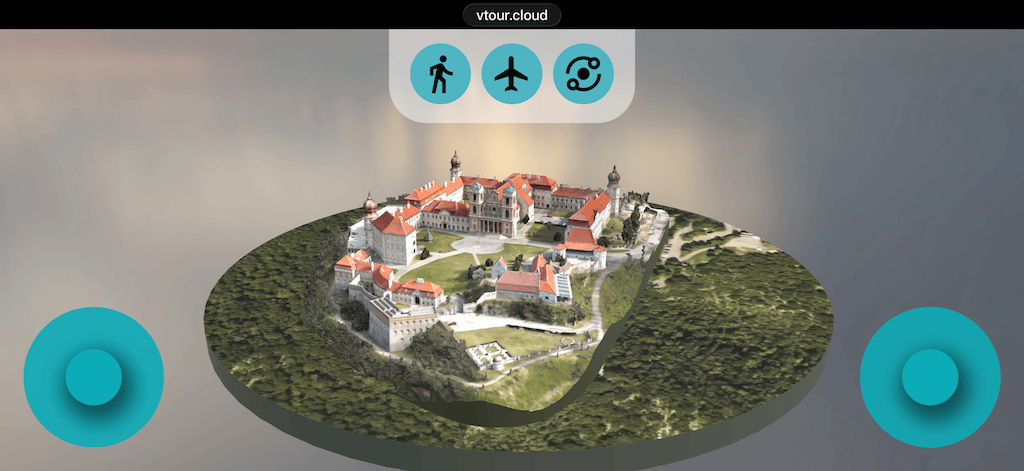
Another new component we added is an interactive joystick controller for touch devices! You can use it for both regular panoramas and 3D models. The component is found in the Misc category in the Components Toolbox. To see it in action, open this on your phone.
Fixed
- Fixed the Material Dart skin, requiring two taps to open the thumbnail menu on mobile devices
- Fixed an issue where changing nodes in immersive VR view did not work when transitions were disabled.
- Fixed video panoramas not opening in Pano2VR when using “Open with…”
- Fixed stereo 360 video displaying as two stacked videos, now gets its own Input Video Type: Equirectangular Stereo
- Fixed drag and drop onto the desktop icon not opening the panorama
- Fixed Auto Rotate not starting after a 3D model had fully loaded
- Fixed a Point Hotspot Target View issue where returning to a model opened the wrong view
- Fixed the $(ui) placeholder not working correctly in User Data
This should be the final beta release! Expect the final release of version 8 to be very soon.
Check the full list of changes here.
Pano2VR 7.1.12
We also have an update for Pano2VR 7.1.12. This update is a bug fix release.
- Fixed pinned videos with Loop set to -1, starting automatically in immersive view or after returning to a node
- Fix for Ghost Hotspots not updating their position
- Fix for when resizing a bottom and/or left-anchored element breaks on undo
- Updated the PDF viewer
Check the full list of changes here.
Object2VR 4.0.2
Object2VR gets some major improvements, especially in the Skin Editor, support for the latest Canon SDK, and, of course, a lot of fixes!
Here are some of the improvements and fixes we’ve implemented:
Improvements
- Added Player Mouse Actions to skin actions
- Added a Target setting for the Go To URL action
- Improved stability when adding large numbers of images
Fixes
- Fixed an issue where importing images via Open With… on macOS could result in no images being imported
- Fixed SVG touch events not working correctly
- Fixed an issue where the Skin Editor’s Live Preview could appear black on Windows
- Fixed Rotate Once so it works correctly after uploading to a server
- Fixed undo behavior when resizing bottom and left-anchored skin elements
Check the full list of changes here.
Updating and Upgrading
To update, go to Pano2VR’s Help menu and choose Check for Updates or download directly from our website.
Pano2VR 7 ➝ Pano2VR 8
If you already have a Pano2VR 7 license, you will only need to pay an upgrade fee for a Pano2VR 8 license. The fee amount depends on when you purchased your version 7 license. Please log in to your account to check the upgrade fee.
If you’d like to start a subscription, sign up here.
If you purchased your license from a reseller, you will need to purchase the upgrade from them. Also note that subscriptions cannot be purchased or offered to you by a reseller.
Download Pano2VR 8 here, then follow the instructions to install and activate it.
You can run both versions on your system.
Getting Help
As always, if you run into issues with your account, license, or the software, feel free to write to us at [email protected].
For Pano2VR 8, we created an in-depth tutorial that covers all the settings for 3D models and Gaussian Splats. Check it out if you haven’t seen it yet:
We have more tutorials in the pipeline for working with 3D models in Pano2VR, so stay tuned!