License
Questions
Help! My license key no longer works!
This could be the result of one of the following:
- Using a license key intended for a different version, e.g. Pano2VR V3.0 key with Pano2VR V4.0
- Using a license key for a different Garden Gnome Software product, e.g. Pano2VR key to try and activate Object2VR.
- A space is added when copy and pasting; look at the start or end of the key and remove any added spaces.
- In some cases it’s possible that the incorrect characters were used; I (upper case i), l (lower case L) and 1 (number one) look very similar, the same goes for 0 (number zero) and O (upper case o).
Will my license work with all operating systems (Windows, Mac, Linux)?
Pano2VR will work with macOS and Windows. Linux is not supported but may work with Wine. We recommend downloading Pano2VR and test with the trial version before purchasing.
If you have purchased our software from the Mac App Store, please contact us and we’ll help you out.
Link to this answer: Will my license work with all operating systems (Windows, Mac, Linux)?
Can I purchase the license in a different name or the name of my company?
Generally, the license will be in the name of the person that has purchased the license key. When checking out, you will see a Comment box. Here, you can provide an alternative name; or if you are purchasing more than one user, a company name (but not an e-mail address).
Alternatively, you can send us an e-mail to change the name if you did not do this at the point of purchase. Please note that a request can only be authorized by the original purchaser, and a license can only be put in a company name if the license is for two or more users.
Link to this answer: Can I purchase the license in a different name or the name of my company?
Will my license expire?
The perpetual license will not expire and includes free updates for the version/release purchased. Major releases of the software will require a paid upgrade.
If you have a subscription, upgrades to major releases are free and will not expire so long as the subscription continues.
How many people can use the software?
A single license is valid for one user. More users can be added during or after the initial purchase. Please see, How can I add users to my license? or How do I purchase your software?.
Each user can activate up to 2 installations (i.e., one for a desktop and one for a laptop computer).
Do you offer educational licenses?
Pano2VR and Object2VR Student and educational licenses are available upon request. Contact our support team for more information.
I have lost the email with my license key. Can you resend my key?
You can access all of your keys when you log in to your account on our website. If you have forgotten your password, click, Lost Password, to reset it. If you do not remember your account details at all, send us an email and we will try to help you.
Link to this answer: I have lost the email with my license key. Can you resend my key?
How do I use a license key for all users in a computer lab?
If you have an EDU license for a computer lab, you may want to store the license key for each computer rather than for each user account. Pano2VR and Object2VR will also check the local machine
For example: For Pano2VR 5 the license key can be stored on Windows at:
[HKEY_LOCAL_MACHINE\Software\GardenGnomeSoftware\Pano2VR\license]
"key_v5"="yourkey"
In Mac OS X you can copy a plist file with the key from
/Users/your_username/Library/Preferences/com.gardengnomesoftware.Pano2VR.plist
to
/Library/Preferences/com.gardengnomesoftware.Pano2VR.plist
Link to this answer: How do I use a license key for all users in a computer lab?
How can I upgrade and/or add users to my license?
You only need to upgrade your license if:
- Upgrading to a major release (i.e., from 7.0 to 8.0)
- Object2VR single user to ObjectVR studio or Object2VR pro
- Adding additional users
If you purchased your license from a reseller, please contact the reseller to upgrade your license.
If you purchased your license from the Mac App Store, please contact support to get your upgrade.
To upgrade:
- Log in to your account at http://ggnome.com/my-account.
If you purchased a license in the past but haven’t activated your account yet, you can use Lost your password? and enter the email address associated with your license. You will then receive an email to reset your password. - Click License Keys to see all of your licenses.
- Click upgrade to see available options (upgrade to new version, or to add more users). If you don’t see upgrade next to your license, then no upgrades are available.
- On the next page, click Upgrade to go through the payment process.
Once the payment is confirmed, you will receive an email containing your license. Your new license will also be available in your account. - Next, open the new version of Pano2VR or Object2VR. You will see a Welcome Screen. At the bottom of that screen, click I have a license key. This will open a browser window prompting you to log in to ggnome.com. Once logged in, give permission to connect to your account to activate the key.
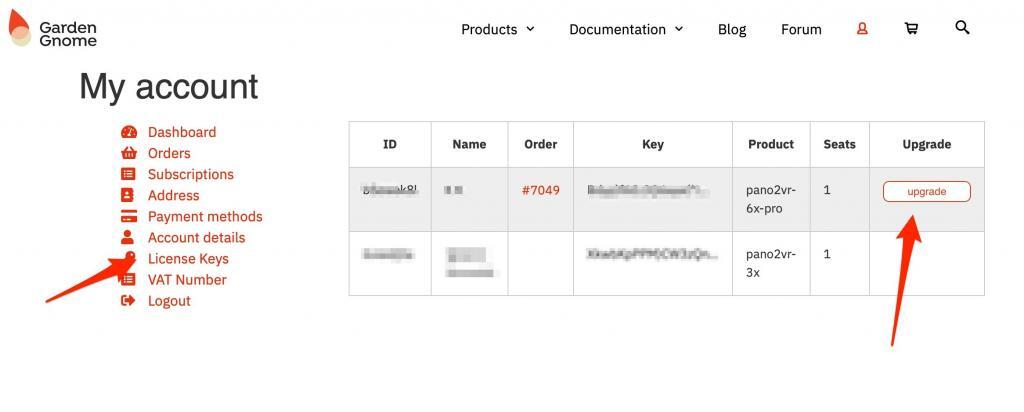
Link to this answer: How can I upgrade and/or add users to my license?
What’s included in the Pano2VR subscription?
When you subscribe to Pano2VR 8, you get Pano2VR and Gnome Cloud Small, our hosting service. You also get all updates and upgrades for free.
Link to this answer: What’s included in the Pano2VR subscription?
How do I purchase a subscription for Pano2VR?
To purchase a subscription, go to the Pano2VR product page and select the option for subscription. You can choose to pay €30/month or €300/year (excluding VAT).
Link to this answer: How do I purchase a subscription for Pano2VR?
I already have a perpetual license for Pano2VR—do I need to switch to a subscription?
No, you do not. We simply offer the subscription as licensing option.
No matching questions. Try a different search.